Trusted by 100,000+ users worldwide
Transcribe Audio to Text in Seconds
Convert any audio file into clear, accurate text instantly using AI transcription and advanced speech recognition. A simple audio to text converter that works online with no setup
Audio to Text
Convert speech and audio recordings to text
Drag & drop your file here or browse to upload
Accepted formats: MP3, WAV, M4A, OGG, FLAC · Max 200MB
Options
Uploading...
Done! Your file is ready.
+ 50M
transcribed
100K +
users
95% +
Accuracy
rate
100 +
supported
Effortless audio to text transcription
Convert audio files into text in seconds using fast AI transcription
1. Upload your video
Upload your video file, paste a link, or drop in an MP4 to start
2. AI transcribes automatically
Our video to text converter turns your video into text automatically with a fast transcription process
3. Edit and export
Review your transcript, make edits, and export it in any format you need
Multiple ways to add your videos
Choose how you want to upload and start the transcription process with our video to text converter
Lightning Fast
Convert audio to text in minutes with high-speed AI transcription that processes audio faster than real time
100+ Languages
Transcribe audio to text across 100+ languages with automatic language detection and translation support
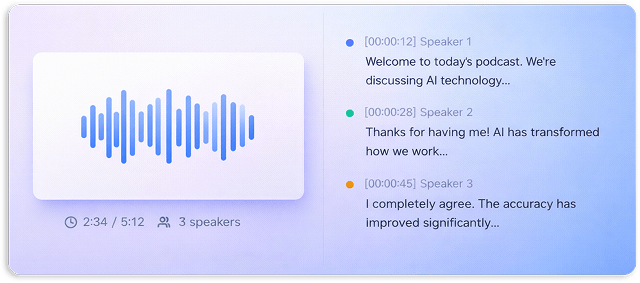
Speaker Detection
Automatically identify and label speakers in your audio to text transcription for clearer, structured transcripts
Timestamps
Every audio to text transcription includes precise timestamps so you can navigate and reference key moments
Multiple Formats
Export your audio to text transcription as TXT, DOCX, PDF, SRT, VTT, or JSON using this flexible audio to text converter
Secure & Private
Your audio files are encrypted and processed securely with privacy-first AI transcription
Search & Edit
Search within your transcription and edit text easily inside a simple text converter app interface
Easy Export
Download your transcripts instantly or integrate them into your workflow using your favorite tools
Transcribe in 100+ Languages
AI transcription supports 100+ languages and accents, making it easy to convert audio files into text from anywhere in the world
🇺🇸
English
🇪🇸
Spanish
🇫🇷
French
🇩🇪
German
🇨🇳
Chinese
🇯🇵
Japanese
🇰🇷
Korean
🇮🇹
Italian
🇵🇹
Portuguese
🇷🇺
Russian
🇸🇦
Arabic
🇮🇳
Hindi
🇳🇱
Dutch
🇸🇪
Swedish
🇵🇱
Polish
🇹🇷
Turkish
Fast AI transcription. Accurate results
Convert audio files into clear, structured text in seconds using AI transcription and advanced speech recognition
Turn audio into text in minutes, not hours
Process long recordings instantly with a powerful audio to text converter built for speed
- Real time transcription from speech
- Batch processing for large audio files
Reliable transcription you can trust
AI transcription trained on real conversations delivers accurate audio to text transcription across accents and languages
- Speaker identification included
- Clean punctuation and formatting
Works with the tools you already use
Import recordings and convert audio files into text directly from the platforms you already use every day
Zoom
Google Meet
Google Meet
Youtube
Vimeo
Loom
Dropbox
Google Drive
Made for anyone who works with audio
Whether you want to transcribe audio to text free or turn recordings into structured content, our AI transcription experience fits how you work
Business Teams
Turn meetings, calls, and interviews into searchable notes using audio to text transcription
Students & Researchers
Transcribe lectures and interviews into structured text for studying, reviewing, and referencing anytime
Content Creators
Convert audio files into blog posts, captions, and scripts with a powerful audio to text converter
Legal & Medical
Create accurate documentation with reliable speech recognition and secure transcription workflows
Journalists & Writers
Transcribe audio to text quickly and never miss important quotes or insights
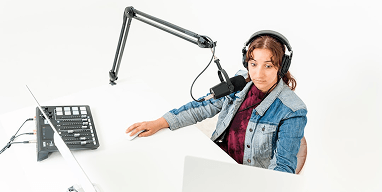
Podcasters
Generate clean transcripts from recordings to improve SEO, accessibility, and content reuse
Why turn audio into text
When you transcribe audio to text, everything becomes easier to search, reuse, and share
Make Content Searchable
Convert audio files into structured text so you can find any idea instantly instead of replaying recordings
Create Documentation
Generate transcripts, meeting notes, and reports automatically with AI transcription
Save Time
Skip manual typing and use free transcription audio to text to process hours of audio in minutes
Improve Accessibility
Add subtitles, captions, and readable formats to make your content accessible to everyone
Used by people who convert video to text every day
From meetings to content, people use our video to text converter to save hours every week
“I use it every day to convert video to text for content. It saves me hours every week.”
MS
Maria Santos
YouTuber
“We run all our meetings through it. The video transcription is fast and easy to search.”
JW
James Wilson
Product Manager
“I can transcribe video to text in minutes. The accuracy and speed are honestly better than anything I’ve tried.”
EC
Dr. Emily Chen
Researcher
More tools to explore
Frequently Asked Questions
How do I convert audio to text?
To convert audio to text, you can either transcribe manually, use AI transcription software, or hire a human transcription service. The fastest and most efficient method is using AI tools like Summary AI, which automatically convert audio files into accurate text within minutes. Simply upload your file, and the AI will generate a ready-to-edit transcript.
Can AI transcribe audio to text?
Yes, AI can transcribe audio to text quickly and accurately. Summary AI uses advanced speech recognition technology to automatically convert spoken words into written text. It works with different accents, multiple speakers, and various audio conditions, making it a powerful solution for transcription needs.
What’s the best audio transcription software?
The best audio transcription software should be accurate, fast, and easy to use. Summary AI stands out as a top choice for converting audio to text thanks to its AI-powered transcription, editing tools, and multiple export options. It’s ideal for content creators, students, professionals, and businesses.

Is Summary AI free for audio transcription?
Summary AI offers flexible pricing, including a free plan or trial with limited transcription minutes. Paid plans provide additional features such as longer transcription time, faster processing, and advanced export formats.
How accurate is AI audio transcription?
AI audio transcription with Summary AI is highly accurate, especially when the audio is clear and free of background noise. The platform uses advanced machine learning models to ensure reliable results, and users can easily edit transcripts to correct any minor errors.
How fast is audio transcription?
Audio transcription with Summary AI is typically processed in near real-time. In most cases, the time it takes to transcribe audio is similar to the length of the recording. For example, a 20-minute audio file can be transcribed in about 20 minutes or less.
What audio formats can I upload for transcription?
Summary AI supports a wide range of audio formats, including MP3, WAV, M4A, and other commonly used file types. This ensures compatibility with recordings from smartphones, voice recorders, and professional equipment.
What text formats can I download my transcript in?
After converting audio to text, you can download your transcript in multiple formats such as TXT, DOCX, SRT, and VTT. These formats are ideal for documents, subtitles, captions, and content repurposing.
Can I convert video to text using Summary AI?
Yes, Summary AI can convert video to text by extracting audio from video files and transcribing it automatically. This is useful for creating subtitles, captions, blog content, and searchable transcripts from video content.
Transcribe audio to text free now
Convert audio files into accurate text using AI transcription and advanced speech recognition
No credit card required • 30 minutes free • Cancel anytime