





Instead of ranking high in search results, everyone who works with SEO or writes content for the web wants to rank in Google AI overviews. Google AI overviews is the short AI overview Google generates that appears in the most desirable position in search results: above all organic and even sponsored search results.
This search feature is powered by Google Gemini and it is designed to provide a short overview of the queries people search for and answer the questions people ask Google very briefly. To improve the visibility of your content by ranking in the AI overviews section, you have to make sure your content is clear, well-structured, and aligned with search intent.
In this guide we will look at how AI overviews have changed the way Google search ranking has changed and what it takes to get your content to rank in this section of the search engine results page among the AI-generated results.
What are Google AI Overviews?
Google AI Overviews are AI-generated summaries that appear at the top of search results in Google. This search feature synthesizes information from multiple different sources to answer user questions.
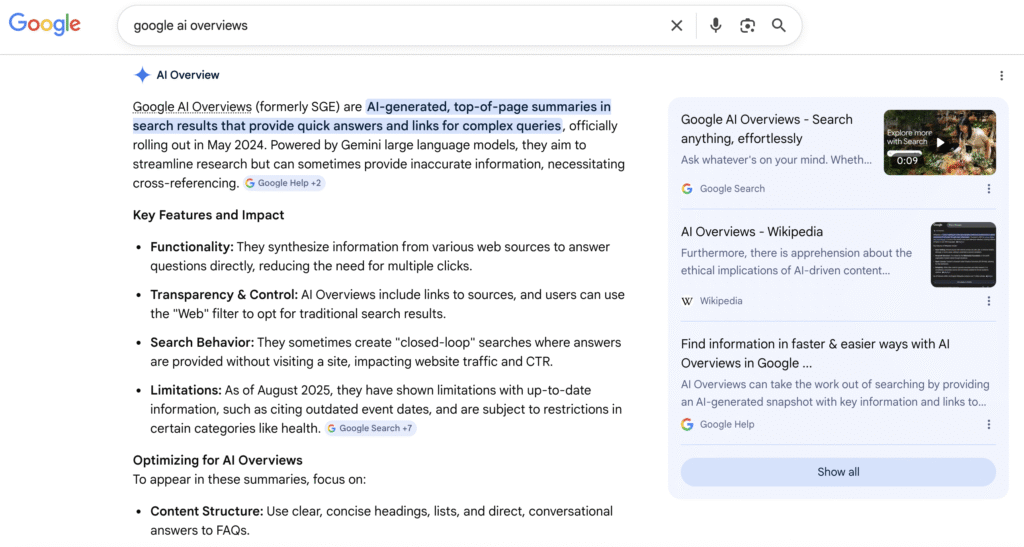
AI overviews launched as part of Google’s Search Generative Experience in May 2023. The feature was rebranded as AI Overviews in May 2024 and it was released broadly in the United States.
Gradually, the launch expanded to over 100 countries. As of 2025, it’s available in more than 200 countries and 40+ languages.
The feature uses LLMs including Gemini 2.0, PaLM2, and a modified version of MUM. It generates concise summaries from multiple sources. According to Google, AI Overviews are designed to let users ask questions with conversational AI and get clear answers faster than ever.
Why does this matter for your SEO content?
Because AI Overviews appear above organic listings they push other search results lower down the page. This makes citation inside an overview one of the most valuable positions in search results today.

How have AI Overviews on Google changed over time?
The best way to understand how AI Overviews works today is to take a look at the phases it went through as it was released across the globe.
Year/Period | Key Development |
May 2023 | SGE (Search Generative Experience) launched at Google I/O |
March 2024 | Google tests AI Overviews in main search without opt-in |
May 2024 | SGE rebranded as AI Overviews, US launch |
August 2024 | Expanded to UK, India, Japan, Brazil, Mexico, Indonesia |
October 2024 | Rolled out to 100+ countries |
March 2025 | Powered by Gemini 2.0; complex queries (coding, math) added |
May 2025 | AI Mode launched for all U.S. users; available in 200+ countries |
Early versions of AI overviews caused a stir for inaccurate and sometimes harmful answers which appeared in them. This pushed Google to refine its systems for improved accuracy. The integration of Gemini 1.5 in 2025 helped reduce hallucinations and they added images and video.
The traffic impact has been severe. According to a study analyzing 25.1 million impressions across 42 organizations, organic CTR for queries with AI Overviews dropped 61% (from 1.76% to 0.61%), and paid CTR fell 68%. On the other hand, brands cited in AI Overviews earned 35% more organic clicks and 91% more paid clicks than those not cited.
Using search intent to rank for AI overviews
The first step to understanding how to rank in Google AI overviews is understanding the biggest mistake marketers make: writing content that’s broadly related to a topic without answering the specific question behind a search.
Ranking in AI overview is not so different than remembering the golden rule of search engine optimization: write not only for crawlers, but humans. Understand why people are searching for certain queries and address those questions in your writing.
Google’s AI doesn’t just analyze whether your content covers a topic. It asks whether your page directly answers the query behind the search. The AI that Google has uses a process called “query fan-out,” analyzing multiple sources to synthesize the most accurate, intent-matched response.
There are three key intent types to optimize for:
- Informational intent: Users want to learn or understand something. For this you see queries like “what is,” “how does,” and “why.”
- Instructional intent: Users want step-by-step guidance. This intent is easy to recognize with “how to,” “steps to,” and “guide” in the keyword.
- Comparison intent: Users want to evaluate options with keywords including “vs,” “best,” “difference between.”
AI Overviews first appeared almost only in the case of users searching informational queries. But they have since expanded to include some commercial and transactional queries as well. This means optimizing for AIO is still mainly focused on informational content, but as time passes we can expect it to increasingly apply across the entire buyer journey.
To align your content with what it takes to rank in AI overviews based on intent:
- Write H2 and H3 headings related to questions that people actually search the answer for
- Put the direct answer within the first 60 words of each section
- Follow a pattern in your content: give the definition of the subject of your writing, provide the context, give examples.
That data shows us that getting cited isn’t just good for visibility, but it also drives more traffic. But how do you actually get cited in AI overviews on Google?

How to optimize content for AI Overviews
There is no single guaranteed formula for appearing in AI Overviews, but Google usually pulls from sources that meet three requirements.
Your content should show expertise with clarity and be easy to extract. We will look at these in more detail in this section.
Here are the most effective strategies for optimizing content for Google AI Overviews in 2026.
1. Lead with a direct answer that is easy to cite
Google’s AI looks for pages where a single short paragraph makes sense on its own, removed from the full article. Start every major section with an approximately 60 word answer to the question posed in the heading. This “answer block” format is the most easy to extract type of content for AI systems.
2. Write headings based on questions
Headings work as anchors for AI responses. When your H2s reflect the queries of real users (e.g. “How do I improve visibility in Google AI Overviews?”) Google can map your content directly to searches that match those questions. Long-tail question headings make the meaning and context of your content less ambiguous and it increases your content’s chances of being cited.
3. Structure with lists, tables, and how-tos
AI Overviews likes formatting that is easy to skim. Use these in your content:
- Bullet lists for comparing things, listing options, and providing examples
- Numbered lists for how-to tutorials for the steps
- Tables for comparison
- Bold text to highlight key terms
This mirrors the structure AI systems use when outputting answers.
4. Write with E-E-A-T in mind
Google’s AI Overviews ranking factors include E-E-A-T: Experience, Expertise, Authoritativeness, and Trustworthiness. To strengthen your content in this regard:
- Name authors and include credentials
- Add external links to trustworthy, authoritative sources
- Keep content updated
5. Use schema markup to structure data
Structured data helps Google understand what each section means without guessing. Make sure to use:
- FAQ Page schema for frequently asked question sections
- How To schema for instructional content
- Article schema for editorial content
- Schema helps Google understand your page.
When Google has less to guess, it’s more likely to extract and cite your content.
6. Target featured snippets first
Featured snippets and AI Overviews often pull the information they show from the same content. Pages that already rank in featured snippets have a higher chance of appearing in AI Overviews. Appear in snippets by writing concise definitions, clear lists, and well-organized how-to steps.
7. Build topical authority through content clusters
AI Overviews prefer sources that show depth and breadth on a topic. A single well-written page is less likely to be cited than a site with 10 interconnected articles covering every angle of a topic. Try building pillar pages that are supported by cluster content, and interlink them clearly.

Get Instant AI Summaries for Any Meeting
Whether you’re a marketer, founder, or SEO specialist tracking AI search strategy, long meetings take up a lot of time and most of what is said is forgotten anyway.
AI Summaries from Summary AI help you stay productive by turning long meetings into clear summaries in seconds. It captures key points and highlights action items while saving your team hours every week.
Just like optimizing content to be cited in AI Overviews, Summary AI extracts what matters, so nothing important gets buried in hours of recordings.

