




Marketing automation is software that many marketing departments use to run marketing tasks automatically. This means that instead of having to repeat certain actions you would do manually, the automation runs it automatically when the action is triggered based on rules and customer behavior.
Instead of clicking send for every email by hand or following up with each lead one by one, your team sets up workflows once and the system carries them out. This makes it possible for businesses of many sizes to reach specific people with targeted messages at the right time, without needing to hire a much larger team.
Companies can earn several times more revenue than what they spend on marketing automation when it is used well.
If you are trying to understand what marketing automation is and how you can use it in your own marketing strategy for 2026, you have come to the right place. This guide explains the key ideas behind marketing automation and walks you through some of the tools available and best practices you should keep in mind.
Marketing Automation Meaning
The most important thing to know about marketing automation is that it uses software to carry out marketing actions that would normally require manual work.

A marketing automation platform connects your customer data, content, and communication channels such as email, website, mobile, and social media in one system that acts based on rules you define and triggers you set up.
The term covers a very wide range of use cases. One of the simplest types of marketing automation can mean sending a welcome email right after a person joins your newsletter list. On the more advanced side, a marketing automation can mean running campaigns personalized to certain buyer personas across email, text messages, paid ads, and push notifications across multiple weeks, all based on what each person does in real time.
Marketing automation is related to CRM, or customer relationship management, and the two are often integrated to work better together. A CRM platform tracks customers and gathers all details about them in one place, including activity from the sales team, like phone calls they have had with the client. Marketing automation focuses on sending targeted messages based on where a person is in the customer journey.
Together, marketing automation and the data in the CRM platform help you see who your contacts are, what they do, and how to communicate with them in a more effective way.

What Does Marketing Automation Do?
Marketing automation helps you put your marketing strategy in motion and keep it running. Here are a few common marketing automations that you can consider setting up:
- Send emails when someone takes a certain action on your website or in your app, for example when they download a free resource or they abandon their cart without making a purchase.
- Score and qualify leads by assigning points to contacts based on actions they do such as site visits, email opens, clicks, and form submissions, so sales teams know which leads to focus on first.
- Segment audiences by automatically sorting contacts into groups based on behavior, demographics, purchase history, or lifecycle stage, so each group receives content that fits its needs.
- Run campaigns across several channels by coordinating messages in email, text messages, social media, push notifications, and paid ads from one platform.
- Run A/B tests for marketing by showing different email subject lines, calls to action, or content versions to different groups over a set period, then learning which version performs better.
- Report on performance by tracking opens, clicks, conversions, and revenue so teams can see what works and improve their campaigns over time.
The result of having marketing automation in place is more consistent and more relevant communication with much less manual effort needed on your side. Companies that use marketing automation often see more leads and higher conversion rates than those that rely only on manual systems.
Automation also saves hours of repetitive work per campaign, which marketers can then spend on planning, analysis, and creative work instead of routine tasks.
How Marketing Automation Works
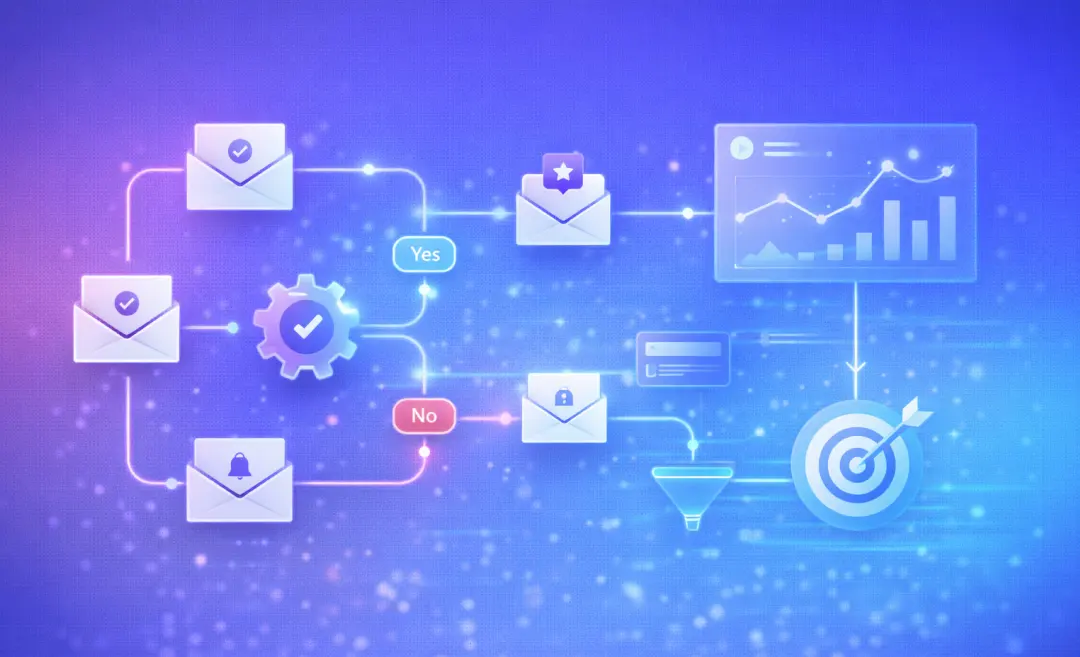
Marketing automation systems usually work by following a trigger with an action. Something the user does, or does not do, triggers a specific response from your system.
Here is a common workflow example:
- A lead visits your pricing page twice within one week. The system treats this as a sign that the lead is interested and increases the person’s lead score.
- Their score passes a threshold that you set. They are moved into a hot leads segment and a salesperson is notified.
- At the same time, they receive a targeted email with a case study that fits their industry. This email is sent automatically as soon as the system detects that pattern of activity.
- If they click the case study link, that click counts as an action in the system, and they are placed into a short nurture sequence that ends with a free trial or demo offer.
- If they do not respond within a set number of days, the system sends a follow-up email and then stops that specific sequence.
When you run workflows like this for hundreds or thousands of contacts at once, it can be extremely hard to manage on your own and still be consistent in your communication. That’s when marketing automation helps. It allows you to keep your strategy on track and the timing on point, even as your list of leads grows.
Behind the scenes, three main parts work together to make marketing automation a success:
- Customer data: collected from website activity, emails, forms, purchases, and CRM records.
- Logic rules: these define what should happen when certain events occur, such as if a contact opens several emails in a row or clicks a specific link.
- Content assets: these are emails, landing pages, ads, and in-app messages, that are ready to send when a trigger happens.
Marketing automation platforms have always existed, but many of them nowadays use artificial intelligence to improve this process of automating actions and triggers.
AI can suggest subject lines, adapt copy to each person, predict the best time to send an email, and find useful patterns in your data more quickly than a person normally could. As these tools improve, they allow a higher level of personalization with very little extra cost per contact.
Learn how AI works to understand how you can use it marketing automation.

Types of Marketing Automation Tools
Marketing automation covers several categories of tools. Each category focuses on a different part of the marketing process. Here is a broad overview of the types of tools you can find for automating your marketing efforts:
Tool Type | What It Does | Examples |
All-in-one platforms | Provide email marketing, CRM, lead scoring, analytics, and campaign management in one system | Salesforce Marketing Cloud, HubSpot, Marketo |
Email marketing automation | Automate email sequences, segment, do A/B tests, and send emails based on triggers | Mailchimp, Klaviyo, Constant Contact |
CRM integration | Keep marketing activity synced with sales pipelines and contact information | Salesforce, HubSpot CRM, Zoho |
Social media automation | Schedule posts, monitor brand mentions, and route all responses to the right team members | Hootsuite, Sprout Social, Sprinklr |
Programmatic advertising | Automate ad buying, bidding, and targeting in real time | The Trade Desk, Criteo, PubMatic |
Chatbots and virtual agents | Handle incoming questions and support with AI-based replies and generate leads | Intercom, Drift, IBM watsonx |
Content management platforms | Manage content, organize materials, and deliver content to different audiences | Adobe Workfront, Contentful |
What is a marketing automation platform
It is usually an all-in-one system that combines several of the functions in the table above. For example, a marketing automation platform usually includes tools for automating your emails, nurturing leads, CRM integration, landing page tools, and analytics in a single dashboard so you have a clear overview of everything.
This helps marketing teams run more complex campaigns across multiple channels without having to move between many separate tools.
Marketing Automation and the Customer Journey
The customer journey is how contacts go from visit to lead to customer and it is rarely a straight line. People might see a social ad, read a blog post, sign up for a newsletter, speak with sales, and compare prices several times before they make a decision. A consistent and relevant experience across all of these touchpoints helps them convert during the journey.
Marketing automation helps create this. The system tracks how each person interacts with your brand across all of the channels, then responds based on what they do, rather than treating everyone the same.
Here is an example of the customer journey and how marketing automation plays a part:
- Awareness: A person visits your site and later sees a retargeted ad that reminds them of your product.
- Consideration: They download a guide and, as a result, an automated email nurture sequence starts sending them helpful educational content.
- Decision: After opening several emails and clicking through, they visit the pricing page. This triggers a high-intent alert to your sales team.
- Post-purchase: After they buy, they receive an automated onboarding series and follow-up messages that help them get more value from your product.
- Advocacy: Satisfied customers receive automated review requests and referral program invitations.
In this context, digital marketing automation is how these touchpoints are connected so they form a clear customer experience for each person, even at a larger scale.
Marketing Automation Best Practices
Good results from marketing automation usually come from having a clear strategy and setting it up carefully, not just from choosing a popular tool. The following practices help you avoid making a campaign that is noisy and unfocused and move toward a system that works in a predictable way.

Define your goals before building workflows
Start with setting specific business goals, such as increasing free trial signups, increasing repeat purchases, or lowering churn among a certain group of customers. Build your automations around achieving these goals so you can measure whether your workflows actually help you reach them.
Map your customer journey first
Outline the stages people go through from first contact to repeat purchase. If you automate a journey that is not clear, you may end up sending messages that do not fit what people need at each stage.
Segment audiences before you send emails
Avoid sending one generic automated message to your entire list. Start by creating simple audience segments, such as new leads, active customers, and customers at risk of churning. Over time, you can add more segments based on actions people take or other things. This lets you send content that feels more relevant and reduces the chance that people will ignore or unsubscribe from your messages.
Keep content relevant and human
Automation can tempt you to send more messages than people actually want. If subscribers start getting frequent emails without clear value, they are more likely to ignore them or unsubscribe. Give each sequence a clear purpose, such as teaching a skill, helping people get started with your product, or making it easier to decide whether to buy, and write in a straightforward and human tone.
Test and improve on a regular basis
Use A/B tests for subject lines, send times, calls to action, and key parts of your content. Look at open rates, click rates, and conversion rates, and use these numbers to guide changes. Treat every workflow as something you will adjust based on results, not as something finished forever and set in stone.
Integrate with your CRM
Connect your marketing automation with your CRM so sales and marketing see the same data. This helps you avoid duplicate outreach, missed follow-ups, and confusion about a contact’s history. When both systems share the same information, handoffs between marketing and sales become smoother. This leads to a nicer customer experience as well.
Roll out in phases
Start with one or two core workflows, such as a welcome sequence for new subscribers and a simple lead nurture flow. Once those are running well and delivering results, you can add more automations.
Get Instant AI Summaries for Any Meeting
When you work in marketing, it includes attending many meetings. You have planning sessions, weekly reviews, syncs between marketing and sales, and company updates. An AI Meeting Assistant can join your calls, record and transcribe what is said with speaker labels, and send a clear summary when the meeting ends. That summary can highlight key decisions, action items, and follow-ups, so nothing gets lost.
This reduces the time teams spend writing notes by hand or chasing details after a call. Instead, the whole team can refer to the same record, stay aligned, and move faster on next steps. Summary AI has an AI Meeting Assistant that does this for you.

