








In an era where our inboxes, calendars, and to-do lists seem to multiply by the minute, the question isn’t if we need help—it’s how much help.
Enter the AI personal assistant—an intelligent, always-ready companion that does the heavy lifting while you stay focused on what truly matters.
In this article we’ll cover:
- What exactly an AI personal assistant is
- The key features and benefits it brings to professionals, freelancers, and teams
- A comparison of human vs. AI assistants
- How to choose and implement the right AI assistant for your workflow
- Real-world best practices and cautionary notes
What Is an AI Personal Assistant?
Definition & Core Capabilities
An AI personal assistant is a software agent powered by artificial intelligence that supports you with administrative, operational, and decision-making tasks.
According to numerous analyses, these assistants can:
- Automate repetitive tasks such as scheduling, email triage, data entry.
- Provide 24/7 access and responsiveness.
- Learn user preferences and habits, and adapt smarter over time.
Why This Matters Now
With workloads increasing and attention spans decreasing, AI personal assistants allow professionals—such as sales teams, freelancers, consultants, and small-business owners—to scale their administrative capabilities without hiring expensive extra staff.
A recent study found that AI assistants improved productivity significantly when integrated into office tasks.
Key Features of Top-Tier AI Personal Assistants
Below is a list of must-have features you should expect from a modern AI personal assistant:
- Task Automation: Scheduling meetings, sending follow-ups, managing reminders.
- Voice/Audit Input: Transcribe spoken ideas into actionable tasks.
- Calendar & Inbox Integration: Understand your availability and priorities.
- Predictive Analytics: Suggest what to prioritize next based on deadlines and preferences.
- Personalization & Learning: Adapt to your style, tone, and patterns.
- 24/7 Availability: Works across time-zones and formats.
- Collaboration Support: Share insights, summaries, action items from meetings.
- Security & Trust: Handles sensitive data securely, with compliance in mind.
Feature Table at a Glance
| Feature Category | What It Does | Why It Matters |
|---|---|---|
| Task Automation | Emails sent, calendar updated automatically | Saves hours of manual work each week |
| Voice / Audit Input | Speech to text, meeting summarization | Captures ideas when you're talking — no typing needed |
| Calendar & Inbox Integration | Knows what you're doing and when | Avoids scheduling conflicts, ensures timely follow-ups |
| Predictive Analytics | Suggests schedule, tasks, priorities | Helps you work smarter — not just harder |
| Personalization | Learns your preferences | Reduces setup time and adapts to how you like working |
| Collaboration Support | Transcripts, action items, team notifications | Aligns teams, improves communication |
| Security & Trust | Encryption, audits, user control | Essential for professional use and sensitive workflows |
Benefits of Using an AI Personal Assistant
Productivity & Time Savings
One of the strongest benefits of AI personal assistants is their ability to free up significant time. Studies show productivity improvements of 15% or more when AI is integrated into workflows.
Here are some benefit bullet points:
- Automates administrative tasks so you focus on revenue-generating work
- Eliminates manual note-taking and follow-up creation from meetings
- Keeps your schedule optimized and your inbox under control
Improved Decision-Making & Focus
By handling routine tasks, AI assistants allow you to engage with information at a higher level. They can:
- Alert you to important deadlines and project risks
- Summarize actionable items from meetings and calls
- Provide data-driven insights rather than you sifting through spreadsheets
Workflow & Collaboration Boosts
Teams using AI assistants gain better alignment and quicker execution. Examples include:
- Automatic capture of meeting minutes and distribution of action items
- Shared task lists across teams, synced by the assistant
- Reduced misunderstandings and improved follow-through
Scaling Without Extra Headcount
For small businesses, freelancers, and agencies, AI personal assistants become a cost-effective way to scale up. Instead of hiring full-time staff for coordination, you deploy an AI that handles many of those tasks.
AI Assistant vs. Human Assistant – A Comparison
| Feature | Human Assistant | AI Personal Assistant |
|---|---|---|
| Availability | Limited by hours / fatigue | 24/7 access, no downtime |
| Cost | $2,000–$5,000+ per month (varies) | Subscription / tool cost — often far lower |
| Speed & Precision | Subject to human error | High consistency, though still requires oversight |
| Learning & Adaptation | Relies on training | Learns automatically from data and usage |
| Handling repetitive tasks | Can become bored / inefficient | Built for repetition, automates with ease |
| Judgment & Strategy | Strong in nuance and emotional context | Growing, but still benefits from human oversight |
Interpretation:
While human assistants still excel at nuanced judgment, emotional intelligence, and complex decision-making, AI personal assistants now handle large volumes of routine tasks faster, cheaper, and without fatigue. The future workflow is often a hybrid model where AI handles task volume, humans handle strategy.
Choosing the Right AI Personal Assistant for You
Key Criteria Before You Commit
✔️ Integration with your tools (calendar, email, CRM)
✔️ Strong voice/text entry support if you speak ideas aloud
✔️ Security & compliance capabilities (encryption, audit logs)
✔️ Learning adaptability—does it personalize?
✔️ Collaboration features for team use
✔️ Clear pricing model
Six-Step Implementation Plan
1. Define the repetitive tasks you want to offload.
2. Choose the AI assistant that integrates with your workflow.
3. Set up initial connections (calendar, email, project tools).
4. Run a pilot for 2–4 weeks, measure time saved and user feedback.
5. Train and refine the assistant—teach priorities, preferred tone, filters.
6. Scale usage across team members and continuously optimise.
Real-World Use Cases
Sales Teams
- Automatically transcribe calls and meetings, extract key action items.
- Send follow-up emails drafted by the assistant.
- Manage prospect scheduling without manual back-and-forth.
Consultants & Freelancers
- Capture project notes and convert to deliverables (proposals, reports).
- Let the assistant organise tasks, deadlines, and client communications.
- Focus on high-value strategy while AI handles coordination.
Students & Knowledge Workers
- Record lectures, convert audio to text; summarise for review.
- Set reminders for assignments, meetings, research tasks.
- Use AI to structure study plans, track progress, and prioritise.
“An AI personal assistant is not just about doing tasks—it’s about doing the right tasks at the right time. Investing in the assistant becomes investing in your efficiency.”
Best Practices & Ethical Considerations
Manage Privacy & Data Security
AI assistants often have access to emails, calendars, files. Ensure:
- Data is encrypted and stored securely.
- The tool has clear permissions and audit trails.
- You comply with privacy regulations and internal policies.
Avoid Over-Automation
While automation brings scale, you still need human judgment. Guard against:
- Blindly accepting AI-generated outputs without review.
- Failing to set guardrails for tone or content accuracy.
- Ignoring the human touch in emails, messaging, and client interactions.
Define Clear Ownership & Oversight
Treat your AI assistant like a team member:
- Set roles and responsibilities (“AI drafts the email, I review”).
- Establish monitoring and metrics to measure time saved, errors reduced.
- Provide feedback loops for learning and improvement.
How Summary AI Amplifies the Value of an AI Personal Assistant
A Fit for the Modern Knowledge Worker
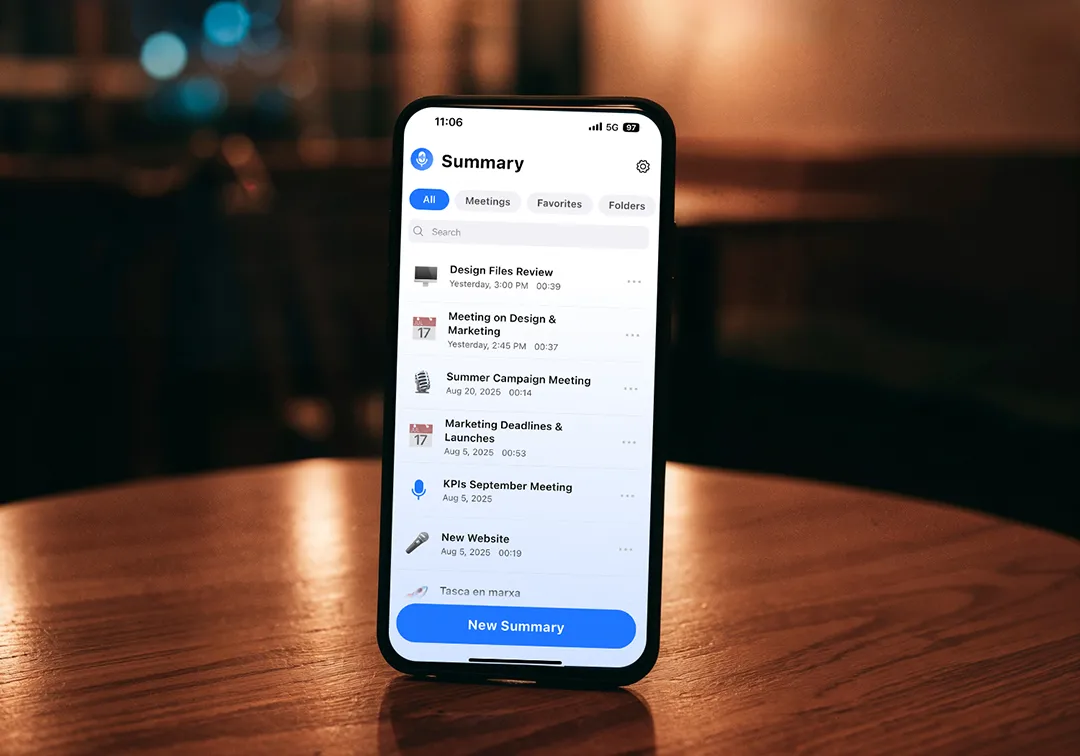
The product you’re reading about—Summary AI—is built around the concept of an AI personal assistant that records, transcribes, summarises, and translates meetings, calls, podcasts, voice-notes and more. It’s tailored for professionals who want to do less typing and get more done.
Key Capabilities That Matter
- Live transcription: Convert spoken words into text in real time.
- Meeting summaries & action items: AI identifies key tasks and assigns responsibility.
- Translation & multi-language support: Works globally across teams.
- Export to editable formats: Use Word, Google Docs, PDFs for collaboration.
- Integration with workflows: Sales, consulting, student projects—they all benefit.
Why It’s a Game-Changer
With Summary AI you’re not just using an assistant—you’re elevating your workflow. You free your mind from admin clutter, you stay in the conversation instead of taking notes, and you convert recording into action. It’s the ideal blend of human insight + AI efficiency.
Final Thoughts
The concept of an “assistant” is evolving. It’s no longer about someone sitting next to you taking notes—it’s about a smart, responsive, digital partner that amplifies your ability to get things done.
If you’re a professional working in a fast-paced environment, handling knowledge‐work, meetings, tasks, and decisions, an AI personal assistant isn’t a luxury—it’s essential. The time, clarity, and scale you gain make it a high-impact investment.
Tools like Summary AI bring this power into your hands—turning conversations into text, text into actions, and actions into results.
Ready to upgrade from “busy” to “strategic”? Explore Summary AI and let your AI personal assistant work while you lead.
FAQs about Podcasts and Transcripts
1. What is an AI personal assistant and how does it work?
An AI personal assistant is a smart software tool powered by artificial intelligence that helps you manage your work by making it more efficient. AI agents often use AI such as machine learning and natural language processing to understand your commands, learn your preferences, and automate repetitive workflows. Essentially, it acts as a virtual productivity partner available 24/7 to simplify your daily operations.
2. What are the best AI personal assistants for productivity in 2025?
Some of the top AI personal assistants in 2025 include:
- Summary AI – ideal for recording, transcribing, and summarizing meetings.
- Google Assistant – for voice-based commands and home/work integration.
- Microsoft Copilot – for document automation within Office apps.
- Notion AI – for organizing notes and knowledge bases.
- x.ai – for automated meeting scheduling.
These tools help boost efficiency by eliminating manual admin tasks and improving decision-making accuracy.
3. Can AI personal assistants replace human assistants completely?
While AI assistants excel at repetitive, data-driven tasks, they still lack the empathy, strategic thinking, and nuanced understanding that human assistants provide. In most cases, the best approach is a hybrid model — where AI automates routine operations, and humans focus on relationship-building and creative decision-making.

