






Every successful meeting — whether it’s a team sync, client call, or board presentation — depends on one thing: clarity. And nothing brings clarity better than a solid meeting notes template. Yet most people still walk out of meetings unsure about action items, owners, timelines, or decisions made.
In this guide, you’ll learn:
- What meeting notes are and why they matter
- The essential parts of an effective meeting notes template
- The best formats and examples for different meeting types
- A comparison of manual vs. AI-powered meeting notes
- Free, ready-to-use templates
- How Summary AI can automate your meeting notes instantly
Let’s get your meetings organized.
What Are Meeting Notes?
Meeting notes are concise written records of what happened during a meeting. They typically include:
- Key points discussed
- Decisions made
- Action items and owners
- Important dates or deadlines
- Follow-up tasks
While not as formal as meeting minutes, notes provide clarity and accountability — especially in busy teams that depend on fast execution.
Why Every Team Needs a Meeting Notes Template

A meeting notes template ensures:
- Consistency: Everyone captures information the same way.
- Speed: You don’t waste time formatting.
- Accuracy: Important decisions and action items aren’t forgotten.
- Alignment: Teams stay on the same page.
Using a template also reduces cognitive load, so you can focus more on the discussion and less on note-taking.
The Essential Components of a Great Meeting Notes Template
Not all templates are created equal. The best ones include:
1. Meeting Overview
- Date
- Time
- Location or link
- Attendees
- Meeting leader
2. Objective / Purpose
One sentence describing why this meeting exists.
3. Agenda Items
A structured list of topics to discuss.
4. Key Discussion Notes
Bullet points summarizing the conversation.
5. Decisions Made
Documented outcomes that affect next steps.
6. Action Items
Each with:
- Task
- Owner
- Deadline
7. Next Meeting (optional)
Date/time or “to be scheduled.”
Types of Meeting Notes Templates (With Examples)
Below are several templates for different real-world needs.
1. Basic Meeting Notes Template
| Section | Details |
|---|---|
| Meeting | |
| Date & time | |
| Attendees | |
| Objective | |
| Agenda |
|
| Discussion Notes |
|
| Decisions |
|
| Action Items | Task |
2. Team Sync Meeting Notes Template
Team Stand-Up Template
Objective: Weekly alignment Duration: 15–30 minutes
Template:
- Updates:
- Team Member 1 –
- Team Member 2 –
- Blockers:
- Issue
- Priorities for Next Week:
- Priority 1
- Dependencies:
- Notes & Decisions:
- Action Items:
Perfect for product teams, engineering, sales, and operations.
3. Client Meeting Notes Template
Designed for consultants, agencies, sales teams, and account managers.
Template:
- Client Name:
- Project / Account:
- Meeting Goal:
- Agenda:
- Key Insights:
- Client Requests:
- Decisions:
- Action Items:
- Follow-Up Date:
4. Project Kickoff Meeting Notes Template
Essential for project managers and cross-functional teams.
Template:
- Project Name:
- Stakeholders:
- Scope Summary:
- Timeline:
- Roles & Responsibilities:
- Risks / Concerns:
- Next Milestones:
- Action Items:
This template helps avoid scope creep and confusion later on.
5. Board Meeting Notes Template
More formal and aligned with governance standards.
Template:
- Opening Remarks:
- Financial Overview:
- Department Reports:
- Strategic Discussions:
- Motions / Votes:
- Resolutions:
- Action Items:
- Closing Notes:
Manual Notes vs. AI-Powered Meeting Notes: Comparison Table
| Feature | Manual Notes | AI Meeting Notes (e.g., Summary AI) |
|---|---|---|
| Accuracy | Depends on note-taker | Highly accurate transcription |
| Speed | Slow | Instant summaries in seconds |
| Consistency | Varies | Templates auto-applied |
| Action Items Detection | Manual | Automatic extraction |
| Focus | Split attention | Fully focused on meeting |
| Cost | Time-consuming | Affordable & automated |
| Languages | Limited | Multi-language support |
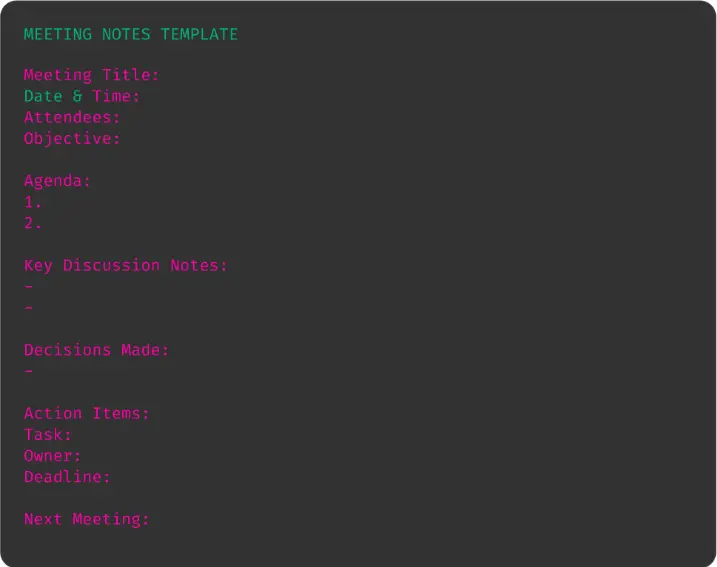
Free Download: Universal Meeting Notes Template (Copy & Paste)
How Summary AI Makes Meeting Notes Effortless
Summary AI takes your meeting notes template and automates everything.
With the app, you can:
1. Record any meeting — physical or online
Capture conversations from Zoom, Google Meet, Teams, or in-person discussions.
2. Get instant AI-generated notes
The app produces:
- Summaries
- Action items
- Key decisions
- Deadlines
- Speaker tags
3. Organize meetings automatically
Notes are saved, categorized, and searchable in your workspace.
4. Share notes with your team
Send meeting summaries instantly through:
- Slack
- Notion
- Google Docs
5. Customize outputs to your template
You can apply your preferred meeting notes template directly inside the app.
How to Use Summary AI as Your Meeting Notes Template Tool

Step 1: Open the Summary AI app
Start a new recording.
Step 2: Record your meeting
The app transcribes in real-time.
Step 3: Let AI generate the summary
It creates structured notes using your template format.
Step 4: Edit if needed
Add your own context or annotations.
Step 5: Export or share
Share via PDF, email, Notion, or any tool you prefer.
Best Practices When Creating and Using Meeting Notes Templates
1. Keep it simple
If a template is too complex, no one will use it.
2. Prioritize action items
Meetings only matter if they lead to execution.
3. Use bullet points
Avoid long paragraphs — clarity is key.
4. Capture decisions clearly
Put them under a separate section for easy scanning.
5. Use Summary AI to automate everything
Focus on the meeting, not the note-taking.
Conclusion: The Right Meeting Notes Template Transforms Your Meetings
If your team struggles with unclear outcomes, missed deadlines, or scattered meeting notes, a solid meeting notes template is the first step toward clarity and alignment.
But manually filling out templates is time-consuming.
That’s why Summary AI is the smarter choice.
In seconds, it records, transcribes, summarizes, and organizes your meetings—so you never miss a detail again.
Try Summary AI today and turn every meeting into actionable results.
FAQs About Meeting Notes Templates
1. What is the best meeting notes template format?
The best meeting notes template is clear, structured, and easy to review. It typically includes the meeting details, key points discussed, decisions made, and action items with owners and deadlines. This format helps teams quickly understand outcomes and next steps without reading a full transcript.
2. How do I create effective meeting notes?
Effective meeting notes include:
- A clear agenda
- Attendees and roles
- Key discussion summaries
- Decisions made
- Action items with owners and deadlines
AI tools like Summary AI automate this by generating structured notes instantly from your meeting recording.
3. What should be included in meeting minutes?
Meeting minutes should contain:
- Date, time, and participants
- Main topics covered
- Decisions and approvals
- Assigned tasks
- Next meeting details
Using a consistent meeting notes template ensures nothing important is missed.
4. How can AI help with meeting notes?
AI tools such as Summary AI can:
- Record and transcribe meetings
- Auto-generate summaries
- Extract decisions and action items
- Organize notes into templates
This saves teams hours of manual note-taking and reduces errors.
5. Are there different templates for different types of meetings?
Yes! Templates vary depending on the meeting type:
- Team meetings
- Client calls
- Board meetings
- Project kickoffs
- Scrum or stand-ups Summary AI can automatically format notes based on your meeting style and content.

